
howto
Configuring Solid Pipe Weight
How Creo uses piping data to calculate mass properties when generating a solid pipe.
When Creo generates a solid pipe, it can use the piping data to calculate mass properties such as mass, density, and center of gravity.
How Creo determines the material information for the pipe solid is controlled by the following config.pro option:
piping_material_source
Creo provides two values:
weight_length— Uses the pipe's weight-per-length information.material_dir— Uses an assigned Creo material file.
The method you choose should match how your organization's piping library is maintained.
Note: A pipe solid must be generated before Creo can perform mass-property calculations on the pipe geometry.
Setting the Piping Material Source
To review or change the setting in Creo:
Go to File → Options.
Open Configuration Editor.
Search for:
piping_material_sourceSet the value to either:
weight_lengthor:
material_dirSave the configuration to the appropriate
config.proif the setting should remain available for future Creo sessions.
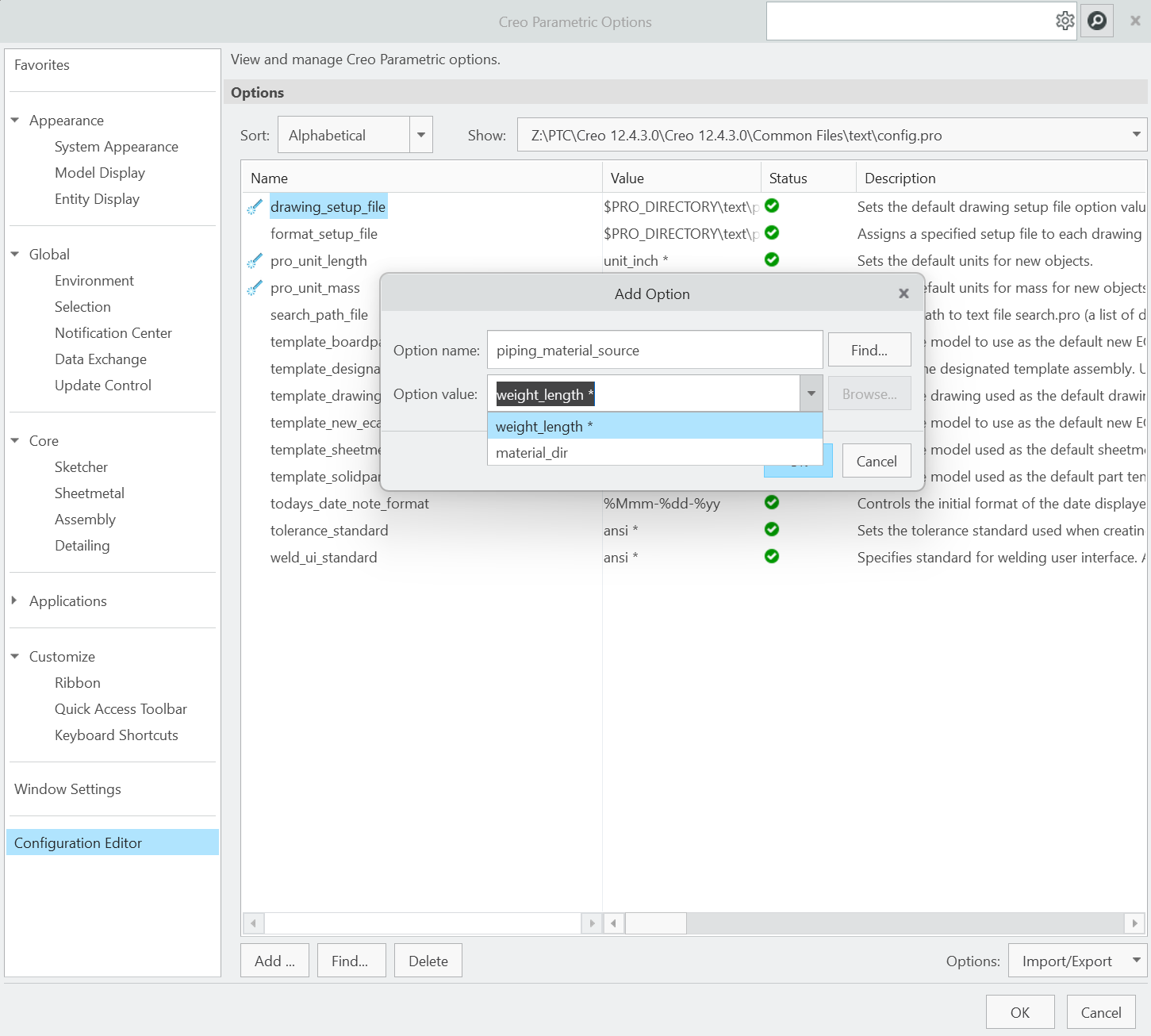
PTC currently defines weight_length as the default value.
Option 1 — Weight / Length
Set:
piping_material_source weight_length
With this method, Creo uses the WT_LEN value associated with the pipe to determine the density used by the generated pipe solid.
This can be useful when your piping data already contains reliable weight-per-length values for each pipe size and schedule.
How Creo Uses WT_LEN
Creo derives the solid pipe density from the weight-per-length value and the pipe's cross-sectional area.
At a high level:
Density = WT_LEN / Pipe Cross-Sectional Area
The cross-sectional area is calculated from the pipe's:
Outside diameter
Wall thickness
Because these values are used together, the following piping information should all be correct:
WT_LENOutside Diameter
Wall Thickness
Unit System
When a pipe solid is regenerated in Assembly mode, Creo checks the current piping information and can update the density of the solid accordingly.
Note: If the pipe solid is regenerated independently in Part mode, the piping line-stock information is not available and the existing density value remains unchanged.
Pay Attention to Units
This is the most important consideration when using the weight_length method.
Creo supports several unit systems, and pound-mass and pound-force are not interchangeable values.
For example:
Creo Parametric Default uses inch, pound-mass (lbm), and seconds.
IPS is a force-length-time system using inch, pound-force (lbf), and seconds.
Because Creo reports density as mass per unit volume, values copied directly from a handbook or piping catalog may not be correct if the source data uses a different unit system than the Creo model.
Important: Verify the unit system used by your piping data before entering or converting
WT_LENor density values. Do not assume a value expressed inlb/in³can be used unchanged in every Creo English-unit system.
For Spec-Driven Piping libraries, the pipe Master Catalog also contains a PRO_UNIT_SYS field identifying the Creo unit system used by that data.
Option 2 — Material Directory
Set:
piping_material_source material_dir
With this method, Creo uses an assigned Creo material file to determine the material properties of the pipe solid.
You must also configure:
pro_material_dir
to point Creo to the directory containing your organization's material files.
For example:
pro_material_dir C:\Creo_Standards\Materials
PTC recommends using the full directory path.
In a Spec-Driven Piping library, the Pipe Master Catalog can associate piping data with an existing Creo material file using the MATL_FILE field.
When Creo creates or regenerates the pipe solid, the associated material can then provide the density used for the solid's mass properties.
This approach can be useful when your organization already maintains standardized Creo material files and wants piping solids to use those same material definitions.
Which Method Should You Use?
Both methods are supported, but they manage the information differently.
Use weight_length when:
Your piping library already contains trusted weight-per-length values.
Weight per unit length is the primary information used to define your pipes or hoses.
You are comfortable maintaining the appropriate
WT_LENvalues for each pipe configuration.
Use material_dir when:
Your organization already maintains Creo material files.
You want the pipe solid to use the same material definitions as other Creo models.
Density is more naturally managed as a material property rather than as weight per length.
Whichever method you use, the important part is to maintain one consistent source of truth for the pipe's mass-property information.
Verifying the Result
After changing piping material information:
Regenerate the piping assembly.
Make sure the pipeline has solid pipe geometry.
Review the pipe solid's material and mass properties.
Confirm that the reported mass or weight is reasonable for the pipe size and length.
For Spec-Driven Piping, Creo can also report pipe-segment weight and center-of-gravity information through its pipeline reporting tools.
If the calculated result appears incorrect, check:
piping_material_sourceThe model and piping-library unit systems
WT_LENPipe outside diameter and wall thickness
Assigned material and material density
pro_material_dir, when usingmaterial_dir
Additional PTC Documentation
PTC Help – Configuration Options for Piping
PTC Help – Setting the WT_LEN Parameter
PTC Help – About Creating a Solid Pipe
PTC Help – Pipe Master Catalog File
PTC Help – Reporting the Weight and COG Information for Pipe Segments