
howto
Setting the Creo Working Directory
How to set a default Creo working directory used each time Creo launches from a specific shortcut.
The Creo working directory is the location Creo uses as the starting point for working with files.
This article describes how to set a default working directory that is used each time Creo is launched from a specific shortcut. If you only need to change the working directory temporarily for your current Creo session, see the PTC documentation linked at the bottom of this article.
Set the Default Working Directory
Right-click the Creo Parametric shortcut you use to launch Creo and select Properties.
Select the Shortcut tab.
In the Start in field, enter the full path to your desired working directory.
Click OK to save the change.
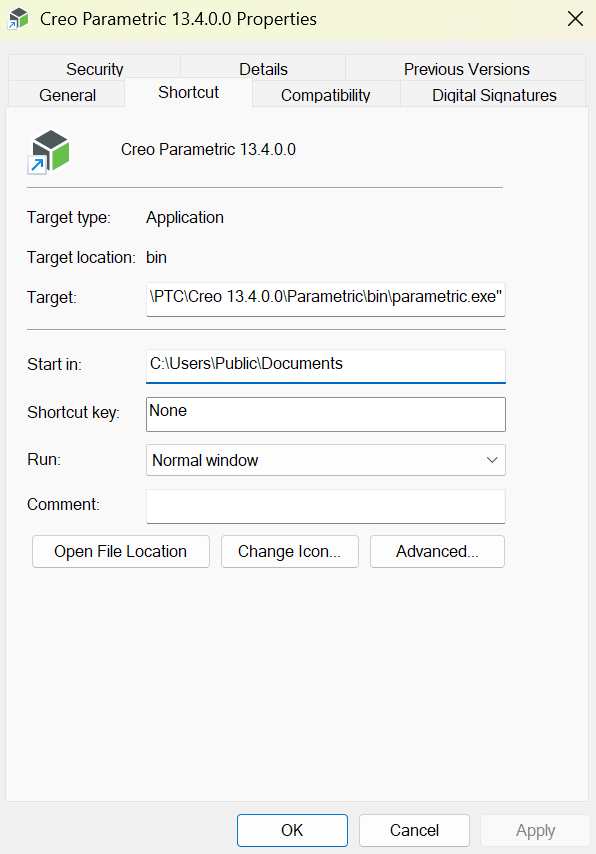
For example:
C:\Users\YourUserName\Documents\Creo
The next time Creo is launched using this shortcut, the specified directory will be used as the startup working directory.
Note: The Start in setting belongs to the shortcut itself. If you launch Creo from another shortcut, such as one in the Windows Start Menu, that shortcut may also need to be updated.
Additional Notes
Many Creo installations initially use a shared location such as:
C:\Users\Public\Documents\
If you want each user to have a separate working directory, update the Creo shortcut used by each user to point to the appropriate location.
Also make sure users have read and write access to whichever directory is selected.
Changing the Working Directory for the Current Session
You can also change the working directory from within Creo without modifying the startup shortcut.
In Creo Parametric, select:
File → Manage Session → Select Working Directory
Choose the desired directory and select OK.
This change applies only to the current Creo session. The selected working directory is not retained after exiting Creo.
Related PTC Documentation
PTC Support – How to Specify the Working Directory in Creo Parametric (CS23977)