
howto
Finding the Host ID
A Host ID is used by PTC to identify the computer associated with a license.
A Host ID is used by PTC to identify the computer associated with a license. You may be asked for a Host ID when generating or updating a node-locked license or when configuring a license server.
There are a few ways to find it. PTC provides methods for retrieving the Host ID directly from the operating system, but Creo users can also find it through the PTC Installation Assistant.
PTC Method
PTC provides instructions for retrieving a computer's Host ID (MAC address) using standard operating system tools.
For the most up-to-date instructions, refer to:
PTC – How to Get MAC Address / Host ID / CPU ID (CS63822)
This is a good method for CAD administrators or IT personnel who are comfortable identifying network adapters and physical addresses.
Finding the Host ID Using Creo Reconfigure
If Creo is already installed, another convenient way to find the Host ID is by running a Reconfigure on the existing installation.
The Reconfigure utility is typically located within your Creo installation directory at a path similar to:
C:\Program Files\PTC\Creo <version>\Parametric\bin\reconfigure.exe
Your exact path may vary depending on the Creo version and where it was originally installed.
If you cannot locate reconfigure.exe, you can also open your original Creo installation files and run:
setup.exe
From the PTC Installation Assistant, select the option to reconfigure an existing installation.
Proceed through the configuration until you reach the License Identification screen. The Host ID recognized by the installer will be displayed on this screen.
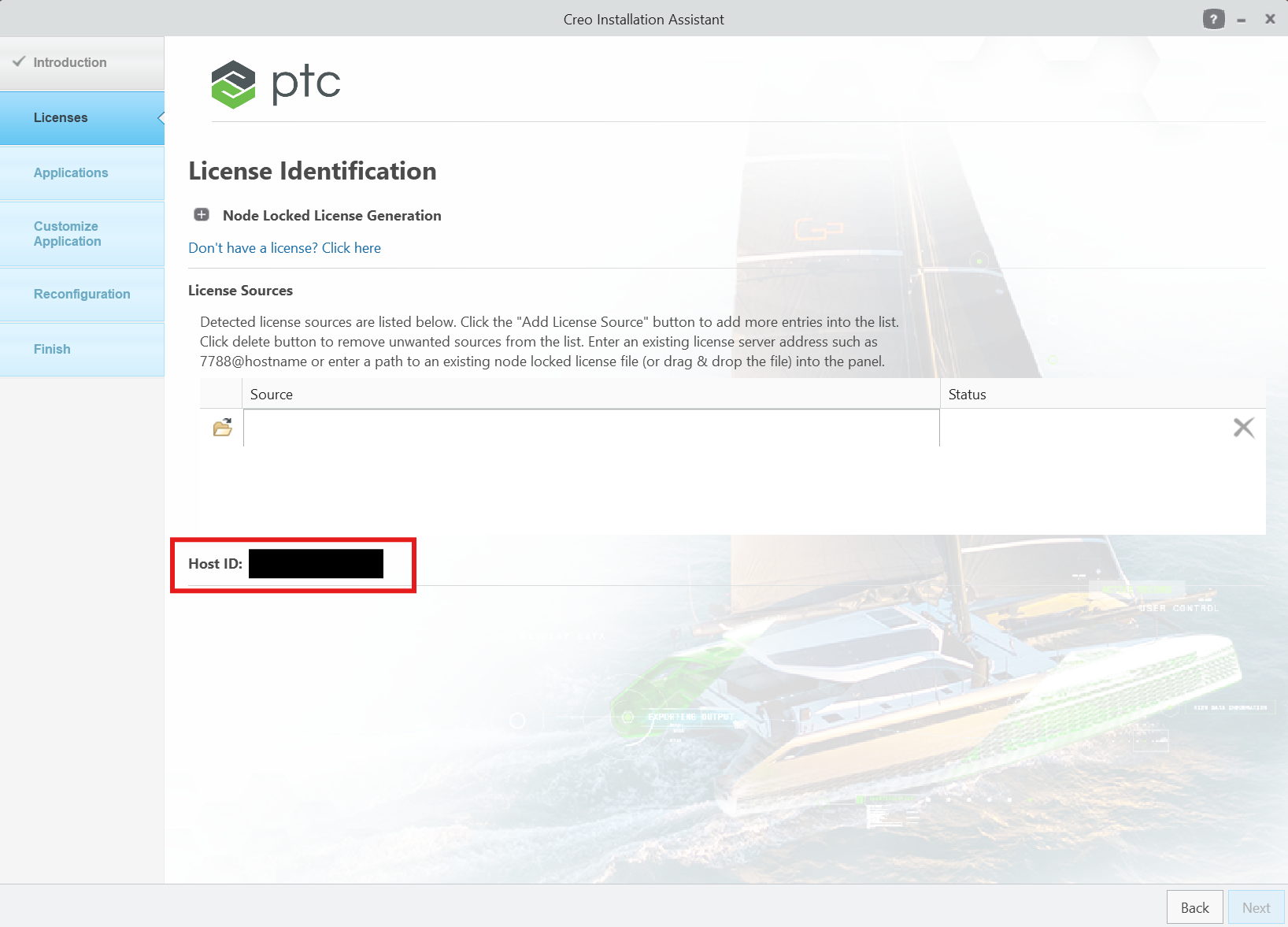
If you are only looking for the Host ID, you do not need to make any changes to your Creo configuration. Simply note the displayed Host ID and exit the Installation Assistant.
Tip: This method can be especially helpful on computers with multiple network adapters, where determining the appropriate MAC address manually may be confusing.
Finding the Host ID Before Installing Creo
If Creo is not installed yet, you can also find the Host ID directly from the PTC Installation Assistant.
Open your Creo installation files and run:
setup.exe
Proceed to the License Identification portion of the installation. The Host ID for the computer will be displayed on the screen.
You can note the Host ID and use it when generating or assigning the appropriate PTC license. You do not need to complete the Creo installation just to retrieve the Host ID.